New Hire Onboarding Video: What to Make and in What Order
Build onboarding videos in order of how often the question gets asked, not in the order a new hire experiences them. Start with the systems and process walkthroughs your managers repeat most, because those return time immediately. The welcome video, which most companies build first, saves nobody any time.
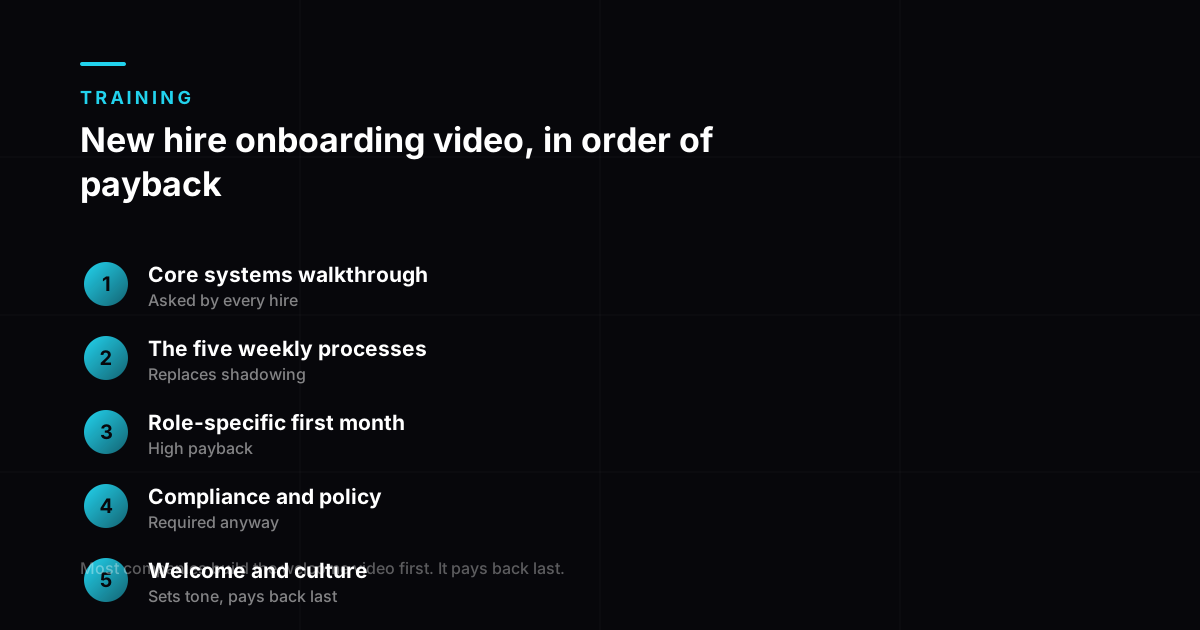
Build new hire onboarding video by repetition, not chronology
The instinct is to build onboarding in the order a new hire meets it: welcome, culture, tools, role. That order optimises for the new hire’s week one and returns almost nothing to the team.
Build instead in order of how many times a manager currently explains the same thing. That is where the hours are.
What onboarding is actually costing you
Worth establishing the size of the problem before deciding what to build, because the numbers are larger than most teams carry in their heads. Gallup finds only 12 percent of employees strongly agree their organisation does a great job of onboarding, and SHRM puts the cost of replacing an employee at 50 to 200 percent of annual salary depending on seniority.
| Reported figure | |
|---|---|
| Onboarding cost per hire | Commonly $3,000 to $7,000 |
| Full cost including systems, training and time | Can reach $7,500 to $28,000 |
| Average time to full productivity | Around 8 months |
| With structured onboarding | Reduced to roughly 3 to 5 months |
| Employees leaving within the first year | Around 38% |
| Of those with poor onboarding, leaving in year one | Around 40% |
| Cost of replacing an employee | 50% to 200% of annual salary (SHRM) |
| Employees who strongly agree onboarding was good | Only 12% (Gallup) |
The row that should drive your build order is time to productivity. Cutting eight months to five is worth considerably more than any saving on the training budget itself, and it is achieved by structure rather than by spend. Video is one of the cheapest ways to add that structure, because it makes the explanation identical for every hire and available at the moment they need it rather than the moment a manager is free. What a training video costs covers how that spend is actually priced.
The seven, ranked by payback
| # | Video | Payback | Length |
|---|---|---|---|
| 1 | Core systems walkthrough | Highest. Asked by every hire. | 5 to 8 min each |
| 2 | The 5 processes done weekly | High. Replaces shadowing. | 3 to 5 min each |
| 3 | Role-specific first-month tasks | High | 5 to 10 min |
| 4 | Compliance and policy | Medium. Required anyway. | 4 to 7 min |
| 5 | Who does what, and who to ask | Medium | 4 to 6 min |
| 6 | Product or service overview | Medium | 6 to 10 min |
| 7 | Welcome and culture | Low, but sets tone | 2 to 3 min |
Most companies build number seven first and stop there. It is the most enjoyable to make and the least useful of the seven.
How to find your first three
- Ask three managers what they explain to every new hire. Look for the overlap.
- Check what questions arrive in team channels in a new hire’s first fortnight.
- Look at where new hires make the same mistake repeatedly. That is a missing module.
- Ask someone who joined six months ago what they wished had been written down.
Presenter or no presenter
| Content | Recommendation |
|---|---|
| Systems walkthrough | Screen recording with voiceover. No presenter needed. |
| Process explanation | Voiceover plus visuals. Presenter optional. |
| Compliance | Often reads as more serious without a face. |
| Welcome and culture | Real people. This is the one that should not be synthetic. |
Keeping it current
Onboarding content goes stale faster than any other training, because tools and processes change constantly. Build it so a single section can be replaced without touching the rest, and review the library every six months. That is the practical case for producing it with AI: updating a training video without a reshoot takes an afternoon rather than a studio booking. Keep modules short for the same reason, and how long each module should run is really a question about what you can replace cheaply.
A library nobody trusts is worse than no library, because people stop checking it and go back to asking a manager, which is the cost you were trying to remove. If you want the seven built as a maintainable set rather than one at a time, that is what our corporate training video service is built around.
What to measure once the library exists
Onboarding video is unusually easy to evaluate because the outcome is observable within a quarter, and unusually often measured by the wrong thing: completion, which only tells you a file played.
- Repeat questions to managers
- Strongest
- Time to first independent task
- Strong
- Library searches per new hire
- Useful
- Module completion rate
- Weakest
Ranked by how much each tells you about whether the training worked. Completion is the easiest to collect and the least informative.
The first row is the one that justifies the budget. If managers are answering the same question three months after a hire completed the module, the material was watched once and never became findable, a chaptering and naming problem rather than a content one. Why nobody finishes your training videos covers that failure mode directly.
Frequently asked questions
What onboarding videos should we make first?
The systems walkthroughs and the five processes your team performs weekly, because those are what managers currently explain to every single hire. Rank candidates by how many times the same explanation gets repeated, and build from the top. That ordering returns time immediately, whereas building chronologically returns almost nothing in the first months.
Is onboarding video worth the investment?
The case rests on time to productivity rather than on training cost. New hires take around eight months to reach full productivity on average, and structured onboarding is reported to cut that to roughly three to five. Against a cost per hire commonly in the $3,000 to $7,000 range and replacement costing about 21 percent of salary, shortening that ramp is where the return sits. The video budget is small next to either number.
How long should onboarding videos be?
Three to eight minutes each, split so every video covers one system or one process. The welcome video is the exception and should be short, around two to three minutes. Resist combining several topics into one longer file, because onboarding content is referred back to constantly and a combined file is impossible to search.
Can onboarding videos use an AI presenter?
For systems walkthroughs, process explanations and compliance, yes, and screen capture with a voiceover is often clearer than any presenter. The welcome and culture video is the one to keep human. That video exists specifically to introduce real people to a new colleague, and a synthetic presenter undermines the only job it has.
How often should onboarding content be reviewed?
Every six months as a standing commitment, and immediately whenever a tool or process changes. Onboarding goes stale faster than any other category of training because it documents systems, and systems change constantly. A review that finds nothing to change costs an hour; a library that quietly contradicts current practice costs trust you do not get back easily.
Does onboarding video replace a buddy or manager check-in?
No, and treating it that way is a common mistake. Video handles the repeatable explanation, which is the part that wastes senior time. It cannot answer the specific question, read whether someone is struggling, or make a new hire feel welcome. The point is to free the human time for the things that actually need a human.