Reels vs TikTok vs Shorts: Can You Post the Same Video?
You can reuse the footage across all three, but in 2026 you should no longer publish the identical file. Instagram now weights original, made-for-platform content and de-ranks video that is reposted, watermarked or recycled without meaningful addition. A competitor watermark remains the fastest way to suppress reach, and safe-zone differences still cover your text. The workable approach is one master edit exported three ways, with the hook, captions and title changed per platform so each receives a distinct asset rather than a copy.
What changed in 2026
This article used to answer its own title with a straightforward yes. The 2026 position is more restrictive, and the change is worth stating plainly rather than burying.
Hootsuite’s 2026 breakdown of the Instagram algorithm describes the platform pushing hard toward original content and explicitly down-ranking material that is reposted from other accounts, carries another platform’s watermark, or is recycled from older posts without meaningful addition. The watermark half of that was always true. The new half is the phrase "without meaningful addition", which reaches clean uploads too.
| What you do | Position before | Position in 2026 |
|---|---|---|
| Re-upload a watermarked download | Suppressed | Suppressed |
| Publish an identical clean export to all three | Fine | Weaker. Reads as recycled |
| Re-cut the hook and captions per platform | Optional polish | The thing that makes it original |
| Republish an old post unchanged | Neutral | Down-ranked |
The watermark problem
Downloading a finished video from TikTok and uploading it to Reels hands Instagram a file branded with a competitor. This remains the single most reliable way to suppress a post. Length matters too: here is how long a reel should be on each platform.
Always export from your edit, never from another platform’s app. This single habit accounts for a large share of unexplained reach collapses.
Reels vs TikTok vs Shorts: what actually differs
| Instagram Reels | TikTok | YouTube Shorts | |
|---|---|---|---|
| Aspect ratio | 9:16 | 9:16 | 9:16 |
| Safe zone pressure | High, UI covers top and bottom | High, right side and bottom | Moderate |
| Audience patience | Lowest | Moderate | Highest |
| Search behaviour | Growing | Strong in-app search | Full YouTube search |
| Caption style | Burned-in expected | Burned-in expected | Title matters more |
| Discovery driver | Completion and shares | Completion and rewatch | Completion and click |
Safe zones are the thing people get wrong
Each app overlays its own interface on your video: captions, username, buttons, progress bar. Text near the edges gets covered. You will not see it in your editing software.
The canvas is 1080 by 1920 pixels. The usable area is considerably smaller than that, and knowing the actual numbers is the difference between designing around the interface and discovering it after publishing.
| Region | Keep clear | What sits there |
|---|---|---|
| Bottom | Around 420px, at minimum 280px | Caption, audio track attribution |
| Right edge | Around 90 to 100px | Like, comment, share, audio disc |
| Top | Around 150 to 250px | Status bar, camera flip, filters |
| Reliable safe zone | Roughly 1080 x 1420, centred | Where hard-coded text belongs |
| Canvas | 1080 x 1920, 9:16 | Per Instagram's published reel specs |
- Keep all critical text inside roughly the central 1420 pixels of the 1920 tall frame.
- Never place a caption in the bottom 420 pixels. Every platform puts something there, and Instagram truncates its own caption after three lines.
- Check the right-hand edge, where the action buttons occupy a strip about 90 pixels wide.
- If you burn in your own captions, centre them and raise them slightly so the platform caption bar never swallows them.
- Preview on an actual phone before publishing, not on a desktop timeline.
The canvas itself is the one part all three platforms agree on: a 1080 by 1920 vertical frame at 9:16, which is what Instagram publishes as its reel size and aspect ratio guidance. Everything above is about what the interface then draws on top of that frame, and that is where the three diverge.
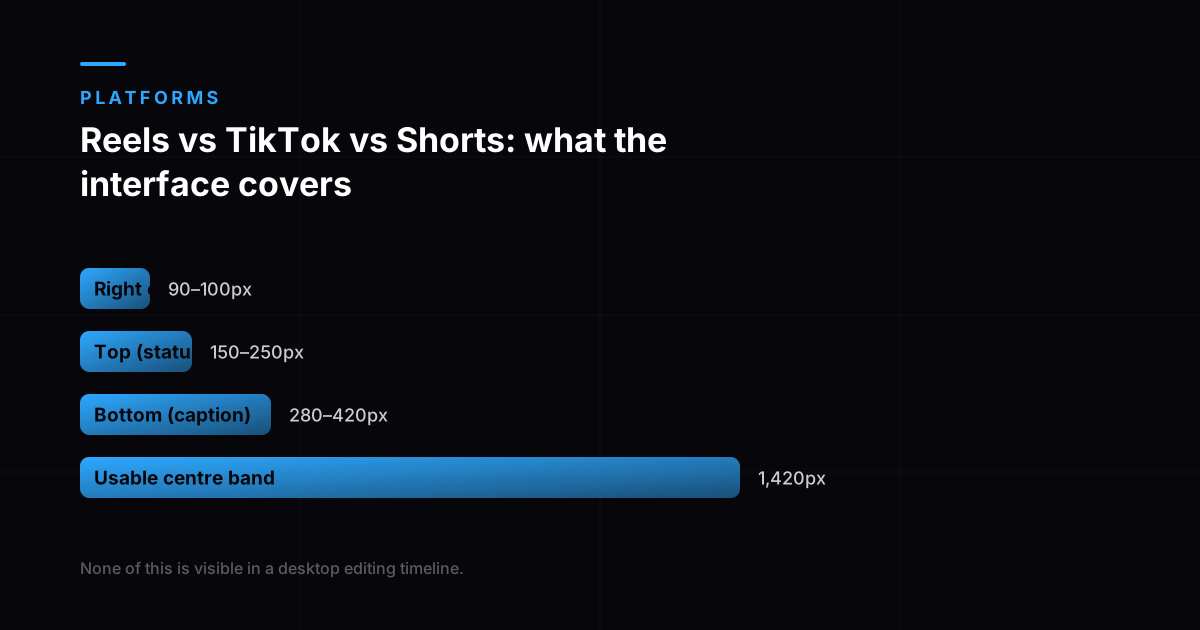
- Right edge (buttons)
- 90 to 100px wide
- Top (status, controls)
- 150 to 250px
- Bottom (caption, audio)
- 280 to 420px
- Usable centre band
- 1,420px tall
Measured against a 1080 x 1920 canvas. None of the covered regions are visible in a desktop editing timeline, which is why text that looks correctly placed disappears in the app.
What to change per platform
| Change | Why |
|---|---|
| Caption position | Different UI overlays |
| Length | Shorts audience tolerates slightly longer |
| Opening line | Search-led on Shorts, feed-led on Reels |
| Title and description | Shorts is indexed by YouTube search |
| Trending audio | Platform-specific and short-lived |
Where to prioritise
If you can only maintain one properly, pick where your buyer already is rather than where reach looks highest. A smaller engaged audience on the right platform outperforms a larger disengaged one, and cross-posting badly to three is worse than posting well to one.
What each platform actually rewards
The three look interchangeable and rank on different things, which is the real reason one upload underperforms on two of them. Instagram's ranking explainer describes reels distribution as driven mostly by predicted reshares and completed watches, a sends-and-completion system. Shorts sits inside YouTube, so titles, descriptions and search intent carry weight that they simply do not carry on Reels. TikTok remains the most purely completion-led of the three.
That is why the per-platform changes in the table above are not cosmetic. Writing a searchable title matters on Shorts and is nearly irrelevant on Reels; engineering a rewatchable loop matters most on TikTok. what to check when reach drops covers the Instagram side in detail, and how long a reel should be covers the length decision each platform implies.
A workable three-platform routine
- Edit one master at 1080 by 1920 with every word inside the centre safe band.
- Cut three different openings. The first two seconds are what distinguish an original from a repost.
- Export three clean files. No platform watermark, no burned-in caption in the bottom strip.
- Write the title and description properly for Shorts only. It is the one indexed by a search engine.
- Add trending audio inside each app rather than baking it in, so attribution works and you can pick per platform.
- Publish natively to each. Never download from one and upload to another.
That routine costs minutes per video rather than a second production. If maintaining it monthly is the constraint rather than the editing, our social media reels service produces the set and the per-platform cuts together.
What each platform counts as short-form
The definitions differ, and that decides where a cut is eligible at all. YouTube treats any square or vertical video up to three minutes as a Short for uploads from October 2024 onward, meaning aspect ratio alone can move a video between Shorts and long-form. Its search and discovery guidance also notes Shorts surface in search results, on the homepage and on channel pages, not only in the Shorts feed, which is why a written title and description earn their keep there and barely register on Reels.
Frequently asked questions
Can I post the same video on Reels, TikTok and Shorts?
You can reuse the footage, but since 2026 you should not publish the identical file. Instagram weights original, made-for-platform content and down-ranks video that is reposted, watermarked or recycled without meaningful addition. Export from your own edit, then change the hook, the on-screen text and the title per platform so each receives a distinct asset.
Does cross-posting hurt reach?
It can now, which is a change from the previous position. Re-uploading a watermarked download has always been suppressed. What is new in 2026 is that a clean but unchanged upload can also read as recycled, because originality became an explicit ranking input rather than only a watermark check. Publishing the same idea in more than one place is still fine. Publishing the same file is what weakened.
How much do I need to change to count as original?
Less than a new production and more than nothing. Changing the first two seconds, the burned-in text and the title is generally enough to present each platform with an asset made for it. The underlying footage, edit and message can stay the same, which is why this costs minutes rather than a second shoot.
What is a safe zone and why does it matter?
It is the part of the frame the app does not cover with its own interface. On a 1080 by 1920 canvas, keep roughly the bottom 420 pixels clear for the caption and audio attribution, about 90 pixels on the right for the engagement buttons, and 150 to 250 pixels at the top for the status bar and controls. That leaves a reliable safe zone of about 1080 by 1420, centred. None of this is visible in your editing software, which is why text that looks perfectly placed on a desktop timeline disappears in the app.
Should I use trending audio on all three platforms?
No, because trends are platform-specific and short-lived, and audio that is current on TikTok is often either unavailable or already stale on Reels. Trending audio is also the one element you cannot bake into a master edit, since it needs to be added within each app to be attributed correctly.
Which platform should a brand prioritise?
Whichever one your actual buyers use, which is often not the one with the largest reach numbers. YouTube Shorts is worth weighting more heavily if your content answers searchable questions, because Shorts is indexed by YouTube search and therefore has a much longer useful life than a feed-driven post.