Can You Make a Product Video From Just Photos?
Yes. A product video can be built entirely from existing product photographs, with no shoot and nothing shipped. The limit is the source image: AI can add motion, environment and lighting to detail that was captured, but it cannot invent detail that was never there. Sharp, well-lit stills on a clean background produce good video. Blurry phone shots do not.
What AI can add to a still product image
- Motion. Camera moves, rotation, the product being picked up or set down.
- Environment. Placing the product in a kitchen, a bathroom shelf, a desk, outdoors.
- Lighting changes. Time of day, softness, direction, mood.
- Scale cues. A hand entering frame, a surface, an object beside it for size.
- Sequence. Several stills becoming one continuous scene.
What it cannot invent
Anything the camera never recorded. If your photo shows the front of a bottle, the model does not know what the back label says. It will produce something plausible and wrong.
| Source photo | What you get | Verdict |
|---|---|---|
| Sharp, even light, clean background | Full range of motion and environments | Ideal |
| Sharp, busy background | Usable, background may need replacing | Good |
| Slightly soft focus | Motion amplifies the softness | Marginal |
| Low resolution or heavily compressed | Artefacts become obvious in motion | Reshoot stills |
| Only one angle available | Limited camera movement | Workable, restricted |
| Fine text or serial numbers must be readable | Will be rendered wrong | Not suitable |
The categories that are genuinely hard
Current models still struggle with certain materials regardless of photo quality. Transparent glass and liquids. Reflective metal and mirrored surfaces. Fine fabric weave and knitwear texture. Jewellery with faceted stones.
This is not a quirk of one tool. Fluid dynamics and cloth simulation are documented weak points across the leading 2026 models, along with hands in close-up, legible text in frame, and holding a character consistent across shots. Knowing the list is what lets you plan around it.
These are not impossible, but they need more attempts, more selection and sometimes a different approach. Any producer who tells you a whisky bottle is as easy as a cardboard box has not made one.
One practical consequence for anything with packaging: generated text comes out garbled reliably enough that label copy, ingredient lists and serial numbers should be composited from your real photography rather than generated and hoped over. That is a solvable production step, not a reason to avoid the method, but it needs deciding at the brief stage.
How to check your own photos in two minutes
- Open the image at 100 percent. If edges look mushy at full size, they will look worse in motion.
- Check the shortest side is at least 1500 pixels. Below that, upscaling artefacts show. This is close to the bar your listings already have to clear: Amazon wants 1,600 pixels on the longest side before it will enable zoom.
- Look for blown highlights. Pure white areas contain no detail, so AI invents what goes there.
- Count your angles. Front, three-quarter and detail gives far more room than front only.
- Ask whether any text must be legible. If yes, that shot needs to stay a photo or be composited.
What this replaces
A studio day, a photographer, a stylist, and shipping the product both ways. For a brand with 40 SKUs, that arithmetic never worked, which is why most product pages stay photos only.
Working from existing images changes the unit economics rather than the output quality. Nothing ships, nothing gets scheduled, and every SKU can have a video instead of only the hero product. What to make with them is covered in product video ideas that sell, and our product video service works from supplied stills.
What one photo can and cannot become
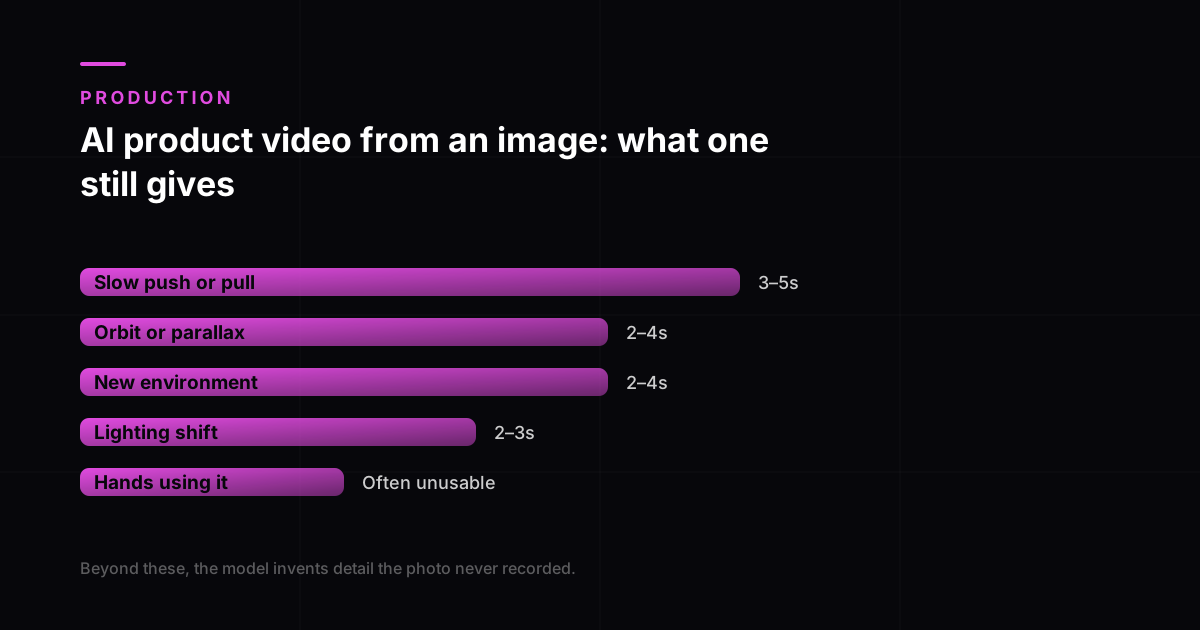
The realistic output from a single still is narrower than the marketing suggests and wider than most brands expect. Roughly, in descending order of reliability:
- Slow push or pull on the product
- 3 to 5s
- Orbit or parallax around it
- 2 to 4s
- Lighting or time-of-day shift
- 2 to 3s
- Product placed in a new environment
- 2 to 4s
- Hands picking it up or using it
- 0 to 2s, often unusable
Our own working ranges. Beyond these the model starts inventing detail the photograph never recorded, which is where the artefacts appear.
The practical consequence is that a fifteen-second product video needs four or five stills rather than one, each carrying a different angle or context. That is still a fraction of a shoot, but it is not one photograph. A brand with a single hero image per SKU is closer to the start of this than it looks.
Shooting stills that generate well
- Shoot the same product from three angles rather than one perfect angle. Coverage beats polish here.
- Keep the background simple and evenly lit. Busy backgrounds produce warping when the camera moves.
- Photograph the product against something for scale, even if you crop it later.
- Capture any packaging text as a separate clean shot, so it can be composited rather than regenerated.
- Avoid heavy retouching. Over-processed stills carry artefacts that motion amplifies.
Those five cost nothing extra at the shoot and roughly double what can be produced from the same session afterwards. If your current library fails the two-minute check above, fixing the photography first is genuinely cheaper than working around it on every video from now on.
When to shoot instead
There is a point where working from stills stops being the cheaper path. If the product is transparent, highly reflective, finely textured or worn on a body, the number of attempts needed to get a usable clip rises fast enough that a short shoot is less expensive and far more predictable. The same applies when packaging text must be legible, since generated text remains unreliable and has to be composited from real photography anyway. A producer who names those limits at the brief stage is telling you something useful; one who says every product is equally easy has not made a whisky bottle. Amazon listing videos have the strictest version of this problem, and Amazon's own image guide sets the resolution bar your stills have to clear first.
The shot buyers most want and least often get
If your stills only support a few seconds of motion, spend them on scale. Baymard Institute's research found 42 percent of users try to judge a product's size from its images, and that 28 percent of sites offer no in-scale image at all. A generated clip that puts the product next to a hand, a surface or a familiar object answers the single most common unresolved doubt, and it is well within what a good still can support.
Frequently asked questions
Can you make a product video from just photos?
Yes, with no shoot and nothing shipped, provided the photos are good enough. The model adds motion, environment, lighting and scale cues to what the camera actually captured. What it cannot do is fill in detail that was never photographed, so a shot of a bottle’s front gives no information about its back label.
What resolution do my product photos need to be?
As a working minimum, at least 1500 pixels on the shortest side, sharp at full magnification, and not heavily compressed. Open the image at 100 percent and look at the edges: if they are soft on a still, motion will amplify that softness rather than hide it. Blown-out white areas are also a problem, because pure white contains no detail and the model will invent what belongs there.
Which products do not work well from photos alone?
Anything where fine text must be legible, and materials that current models still handle poorly: transparent glass, liquids, mirrored or highly reflective metal, fine fabric weave and faceted jewellery. These are not impossible but they need more attempts and more selection, so treat any quote that prices a whisky bottle like a cardboard box with suspicion.
How many angles do I need?
One usable angle is workable but restricts camera movement significantly. Front, three-quarter and a detail shot gives far more room, because the model has real information about the product’s form rather than having to infer it. If you are commissioning new photography anyway, capturing those three costs almost nothing extra.
Is this cheaper than a product video shoot?
Substantially, and the bigger change is which products can justify having video at all. A studio day plus a photographer plus shipping both ways never made sense for a catalogue of forty items, which is why most product pages stay photo-only. Working from existing images means every SKU can have video rather than only the hero product.