Do Product Videos Actually Increase Shopify Conversions?
Yes, though the honest range is narrower than the headline figures suggest. Invesp’s widely-quoted 144 percent add-to-cart lift is a ceiling; typical real-world lifts for mid-market e-commerce sit nearer 20 to 60 percent. A short video reduces the doubt a static photo leaves behind, which is what stalls checkout, so the gain concentrates on products where a photo genuinely leaves a question open.
A photo shows what a product looks like. It does not show how big it is, how it moves, or how it feels to use. That gap is doubt, and doubt is what stops a checkout.
What the data says about product video and Shopify conversion
The direction is not in dispute across the industry. Reported figures vary by source and methodology, but they point the same way.
- The most-quoted figure in this category is Invesp’s: an add-to-cart lift of up to 144 percent after a shopper watches a product video. Worth knowing what "up to" is doing there, which is covered below.
- In Wyzowl’s annual survey, 85 percent of people say they have been convinced to buy something after watching a video, and 96 percent have watched an explainer video to learn about a product.
- The same survey finds 63 percent would rather watch a short video than read about a product, which is the behaviour a product page either serves or ignores.
Why video closes the doubt
- Scale: video shows the product next to a hand or a room, so size stops being a guess.
- Motion: how it opens, folds, pours or fits is the exact thing a photo cannot answer.
- Use in context: seeing it used is closer to trying it than any gallery of stills.
- Speed: a 15-second loop can answer three questions the product page text never gets to.
The one caveat worth stating: a video only helps if the page was losing people to doubt in the first place. If your checkout stalls for price or shipping reasons, video will not fix that, and testing is the only way to know which one you have.
Which products gain most
The lift is not evenly distributed. It concentrates in products where a still image leaves a specific question open, and it is close to zero where photos already tell the whole story.
| Product type | Why video helps | Expected effect |
|---|---|---|
| Anything with moving parts | Motion is the whole question | Large |
| Apparel and anything worn | Drape, fit and scale on a body | Large |
| Products with a setup step | Assembly anxiety is a real blocker | Large |
| Items where size is misjudged | Scale against a hand or room | Large |
| Food and drink | Texture, pour, portion | Moderate |
| Flat, simple, familiar objects | Photos already answer everything | Small |
| Commodity items bought on price | The decision is not about the product | Minimal |
The returns argument, which is usually bigger
Conversion gets all the attention because it is the number on the dashboard. For a lot of stores the more valuable effect is on returns. It is also systematically under-measured. Return data arrives weeks after the sale and rarely gets connected back to the page that produced it.
A product that arrives smaller than the customer pictured comes back. A garment that hangs differently than the flat-lay suggested comes back. Every one of those returns costs the shipping both ways, the handling, and often the item itself if it cannot be resold as new. A video that sets the expectation correctly prevents the sale that was always going to reverse.
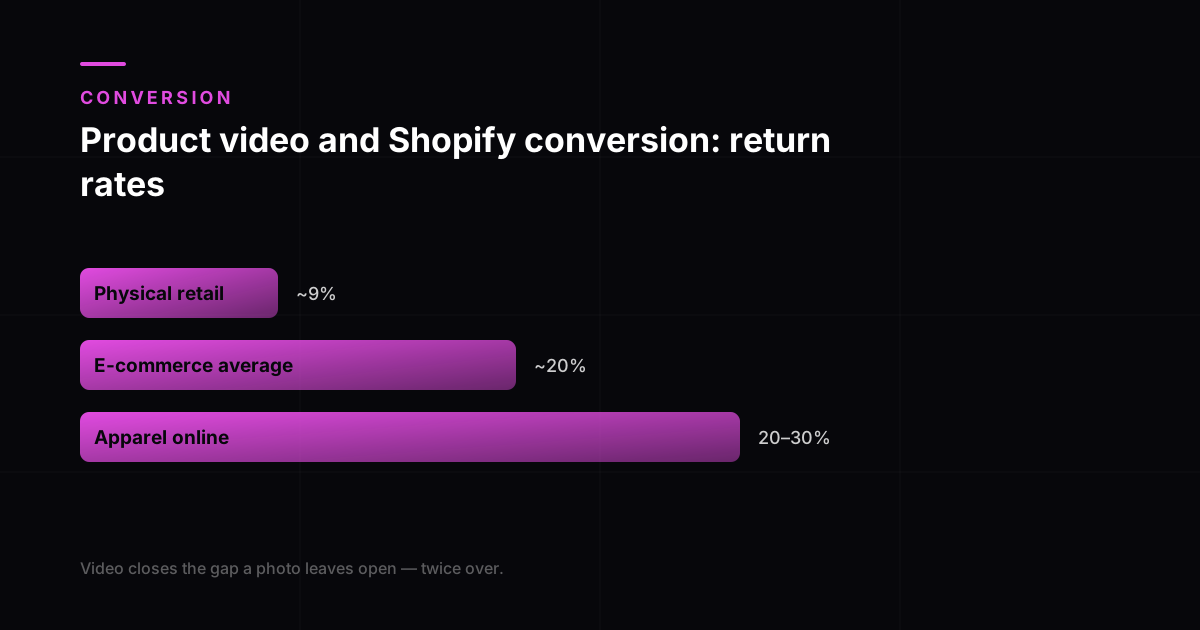
The scale of this is larger than most stores account for. Published 2026 benchmarks put the average e-commerce return rate around 20 percent, against roughly 9 percent in physical retail. Apparel runs materially worse, commonly 20 to 30 percent and reaching higher in some segments.
| Typical return rate | |
|---|---|
| Physical retail | Around 9% |
| E-commerce average | Around 20% |
| Apparel online | 20% to 30%, higher in some segments |
The reason matters more than the rate. Poor fit is reported as the cause of roughly 53 percent of apparel returns, which is to say the single largest category of returns is a question a photograph structurally cannot answer. Fully loaded, an apparel return is estimated to cost in the region of $30 an item once return shipping, processing, inspection, refurbishment and markdown on returned stock are counted.
- Physical retail
- Around 9%
- E-commerce average
- Around 20%
- Apparel online
- 20 to 30%
Industry aggregates rather than controlled research; figures move with segment and methodology. The gap between the first and third rows is the part that holds across sources.
The gap between the first and third rows is the whole argument. In a shop the customer holds the thing, checks the size against themselves and decides before paying. Online they decide from a photograph and find out after. Video is the only element on a product page that closes any part of that gap, which is why its effect shows up twice: once in conversion, and again, usually larger, in what comes back.
Put those together and the arithmetic changes. If half your apparel returns are fit-related, and each costs roughly thirty dollars all-in, then a video that shows garments on a real body at real scale is not competing against your conversion rate. It is competing against a recurring cost line that most stores treat as fixed.
How to test it properly
Most stores measure this badly. They add video to their top products, compare the month before with the month after, see a rise, and credit the video. That comparison includes whatever else changed: seasonality, ad spend, traffic mix, a price move, a review that landed.
- Split test where you can, so the same period and the same traffic sees both versions.
- If you cannot split test, roll out to a subset of similar products and compare against the ones without video over the same window.
- Watch add-to-cart rate rather than final conversion first. It is closer to the video and less polluted by checkout and shipping effects.
- Track how many visitors actually play it. A video nobody presses play on cannot have caused anything.
- Give it a full return cycle before judging the commercial result.
What the video needs to do on the page
A product page video is not an ad and should not behave like one. The visitor is already on your site and already looking at the item, so there is nothing left to sell them on wanting it. The job is narrower: answer the open question quickly and get out of the way.
- Keep it short. Fifteen to thirty seconds is usually enough to settle a single doubt.
- Autoplay muted with captions if the theme supports it, so information arrives without requiring a decision to play.
- Show scale in the first few seconds, against a hand, a body or a familiar object.
- Do not repeat the gallery. If the video shows the same angles as the photos it is page weight with no upside.
- Compress properly. A slow-loading video on a product page can cost you more in abandonment than it gains in confidence.
That last point matters more than it sounds. Page speed affects both conversion and search ranking, so a badly optimised video file can be a net negative even when the creative is good. For the wider treatment of what these videos are and what they cost, see what a product video is and what AI video ads cost in India.
What to do once it works
Roll out in order of doubt, not in order of revenue
The instinct after a successful test is to add video to the best sellers. The better order is products where a still image leaves the most unanswered: anything sized, worn, assembled or textured. That is where the same video earns the most. Best sellers are frequently best sellers precisely because the doubt was already low.
Then keep the cuts separate. A product page loop, a Meta ad and a listing video are three edits from the same footage with different lengths, sound assumptions and safe areas, not one file resized. What a product video is covers what each placement needs, twelve product video ideas covers which format answers which doubt, and our AI product video production cuts the set together so the second and third versions cost a fraction of the first.
Reading the published figures honestly
The numbers in this category come from vendor case studies and platform blogs rather than controlled research, which is why the range is so wide and the headline figures so flattering. Treat them as a direction: video helps most where a still leaves a specific question open, and barely at all where it does not. What is better established is the direction of the effect: the doubt you choose to answer will move your number further than the camera you answer it with.
Before the video: fix what it is built from
A product video generated or shot from weak source material inherits the weakness, and no edit recovers it. The bar is already set by the marketplaces: Amazon asks for 1,600 pixels on the longest side before it will enable zoom, and stills that fail that will not produce clean motion either. Fixing photography first is the cheaper order of operations, because good stills improve every listing image, every ad and every video that follows. A product video can be built from photographs once they clear that bar.
Placement changes the result as much as the video does
Before concluding that video did not work, check that anyone could find it. Baymard Institute's usability research found 35 percent of sites embed product videos where users miss them, against 41 percent of users who watch when the video sits in the image gallery where they expect it. A test that buries the video below the fold is measuring discoverability rather than whether product video helps, and will read as a null result either way.
Frequently asked questions
How much does product video actually increase conversion?
Plan for a 20 to 60 percent lift on add-to-cart for mid-market e-commerce. The 144 percent figure quoted across most articles on this topic is Invesp’s upper bound, achievable on well-executed video for high-consideration products rather than typical. The variation is real and it depends on your product, your traffic and what the existing page was failing to communicate, so treat published numbers as a planning range and run your own test for the actual size.
Where should the video go on a Shopify product page?
In the media gallery alongside the images, usually in the second or third position rather than first. Leading with video means a visitor who wants to scan photos quickly has to get past it, which annoys more people than it helps. Sitting just after the primary image means it is found by the people who are still deciding, which is exactly the audience it is for.
Is one video enough, or does each product need its own?
Each product that has its own open question needs its own video. Products within a range that differ only by colour can usually share one, with the colour shown in the photos. A generic brand video on every product page is the common shortcut and it does very little, because it never answers the specific doubt attached to the specific item.
Will adding video slow my store down and hurt SEO?
It can, if handled carelessly. Host it so it lazy-loads rather than blocking the page, compress it properly, and avoid autoplaying several videos on one page. Done correctly the speed cost is small. Done by dropping an uncompressed file into the theme, it is large enough to outweigh the conversion gain.
Where on the product page should the video go?
In the image gallery, as the second slot rather than the first. The first slot should stay a clean still, because that is what appears in search, in collection pages and in shared links. Putting the video second means it is found by anyone who swipes, which is the behaviour of a shopper actively evaluating, without replacing the image the rest of your storefront depends on. Below the fold is usually too late: the doubt you are answering forms while they are looking at the gallery.
Does the video need sound to work on a product page?
No, and designing for sound is usually a mistake here. A product page visitor is on a desktop at work or a phone in public, and almost none of them will unmute. Anything essential should be visible: show the scale, the motion and the finish, and put any necessary words on screen as text. If your video only makes sense with narration, it is an ad that has been placed on a product page rather than a product video.