What Makes a Good Amazon Listing Video
A good Amazon listing video shows the product doing its main job in the first five seconds, works on mute with captions, and answers the specific doubt that stops someone buying. It is a different cut from a social ad: the shopper is already on your page, so the job is removing hesitation, not creating desire. Since 2026 there is a second audience for the same page. Amazon’s AI shopping assistant reads your listing content to decide which products to recommend, and it cannot watch your video, so anything the video alone communicates is invisible to it.
A listing video is not a social ad with the logo swapped. That single mistake is behind most of the listing video that sits on Amazon doing nothing. The two formats look similar and are built for opposite situations.
Why a listing video is a different cut
On Meta or TikTok, nobody asked to see your product. The ad has to earn attention from a cold scroll, which is why hooks, pattern breaks and tension work there. On an Amazon listing, the shopper searched for the product, clicked your result, scrolled past your images, and is now watching. They are warm. Interrupting them is not the job.
What they are doing at that moment is looking for a reason to stop worrying. Is it the right size? Does it actually work the way the photos suggest? Will it look cheap when it arrives? A listing video that answers those questions converts. One that shouts a hook at somebody who is already sold just delays the click.
| Social ad | Amazon listing video | |
|---|---|---|
| Viewer state | Cold, scrolling past | Warm, actively evaluating |
| First job | Stop the scroll | Remove a specific doubt |
| Opening | Hook, tension, pattern break | Product doing its main job |
| Tone | Personality and energy | Clear demonstration |
| Sound | Often on, often the hook | Assume permanently off |
| Success looks like | A click through to the listing | A click on Add to Cart |
| Length | As short as the hook allows | As long as the doubt takes to answer |
What a listing video needs
- The main benefit shown in the first five seconds, not saved for a reveal. The buyer already knows what the product is.
- Clean product focus that meets Amazon content rules.
- Captions, because most listing video is watched on mute.
- A clear demonstration over a hard sell: show it working, let the buyer decide.
- Scale shown against something familiar. Size is the single most common reason a product gets returned, and a photo rarely settles it.
Start from your reviews, not from a script
The cheapest research available to you is already on your own listing. Read the three-star reviews first. Five-star reviews tell you what people liked, one-star reviews are often about delivery, but three-star reviews are where buyers explain what they expected and did not get.
That gap is your video. If four reviewers mention the strap being shorter than they pictured, show the strap on a person. If they say assembly was confusing, show assembly in real time. You are not writing a commercial. You are pre-answering the question that costs you sales and returns.
Design it for mute
Listing video generally plays without sound until a shopper chooses otherwise, and most never do. Anything communicated only through a voiceover is effectively not in the video. That has three practical consequences.
- Every claim spoken out loud needs to also exist as on-screen text.
- Burn the captions in rather than relying on a platform caption track, so nothing depends on a setting you do not control.
- Keep on-screen text short enough to read at a glance. A shopper on a phone is not going to pause to finish your sentence.
The specs, and the two that gate everything
Amazon publishes technical requirements for detail-page video, and two of them decide whether your project is even possible before you write a script.
| Requirement | Spec |
|---|---|
| Aspect ratio | 16:9 landscape |
| Length | 15 to 30 seconds, with 20 to 30 most effective |
| Resolution | 1280x720 minimum, 1080p recommended |
| File format | MP4 or MOV |
| File size | Typically up to around 500 MB |
| Watermarks | Not permitted |
| Branding in the first 5 seconds | Not permitted |
| Account requirement | Brand Registry enrolment |
| Review time | Usually around two days |
Brand Registry is a hard gate
You cannot add video to a product detail page without being enrolled in Amazon Brand Registry. If you are not enrolled, no amount of production budget changes that, so confirm your status before commissioning anything.
Landscape, not vertical
This is the single most common wasted deliverable in the category. Amazon detail-page video is 16:9 landscape, which is the opposite orientation to everything you are producing for Meta and TikTok. A vertical social cut cannot simply be uploaded here, and a landscape listing cut cannot be dropped into a feed. Budget for two edits from the start rather than discovering it at upload.
No branding in the first five seconds
Amazon enforces this strictly, and it happens to align with what performs anyway. Opening on a logo wastes the seconds where a warm shopper decides whether the video answers their question. The platform rule and the craft advice point the same direction, which is unusual and worth taking advantage of.
Keep it inside Amazon policy
Videos get rejected for policy reasons far more often than for looking bad. The recurring causes are predictable, and all of them are avoidable at the scripting stage rather than in the edit.
- No prices or discount claims. Pricing changes, and Amazon does not want a video contradicting the buy box.
- No contact details, website addresses or anything routing the buyer off Amazon.
- No naming or showing competitor products.
- No unverifiable superlatives such as best selling or number one.
- No customer review quotes presented as endorsements inside the video.
Amazon updates these requirements periodically, so check the current media guidelines in Seller Central before a shoot rather than after a rejection. The content rules above have been stable for a long time, but the specification details around length and file size do move.
The second audience: Amazon’s AI shopping layer
Everything above assumes a human is looking at the page. Since 2026 that is only half the traffic worth planning for. Amazon’s conversational shopping assistant, launched as Rufus and renamed Alexa for Shopping in May 2026 with its underlying logic unchanged, now sits between a large share of shoppers and your listing. It answers questions, compares options and recommends products by reading listing content.
Two reported figures set the stakes. More than 250 million shoppers have used it, with interactions up over 210 percent year on year. And shoppers who use it convert at roughly 60 percent higher rates than those using plain keyword search. Whatever you think of the feature, the traffic arriving through it is unusually ready to buy.
This does not make video less valuable. Enriched listings with comprehensive descriptions, specifications and professional imagery are reported to see 10 to 30 percent higher click-through from AI-generated recommendations, and video is part of what makes a listing look complete to a shopper who arrives. What it changes is the sequencing: write the answer, then film it, rather than filming it and hoping the page catches up.
How to make the two work together
- Take every doubt your video resolves and make sure the same fact appears in the bullets, the description or the A+ content as plain text.
- Use the phrasing shoppers actually use in questions and reviews, since that is the language the assistant is matching against.
- Keep specifications explicit rather than implied. "Fits a 15-inch laptop" is retrievable; a shot of a laptop sliding in is not.
- Treat the video as the closer and the text as the qualifier. One gets you considered, the other converts.
How this differs from your product ad
If you are producing video for both places, produce the listing cut first. It forces you to be clear about what the product actually does, which is the hardest part. The social cut can then borrow that clarity and add the hook on top. Doing it the other way round tends to produce a listing video that is all personality and no information.
They are two edits, not one file resized. That is worth budgeting for honestly, and it is one of the things covered in what a product video actually is and in product video ideas that sell. A third surface has its own rules again: a Blinkit or Zepto tile is scanned in under two seconds at thumbnail size.
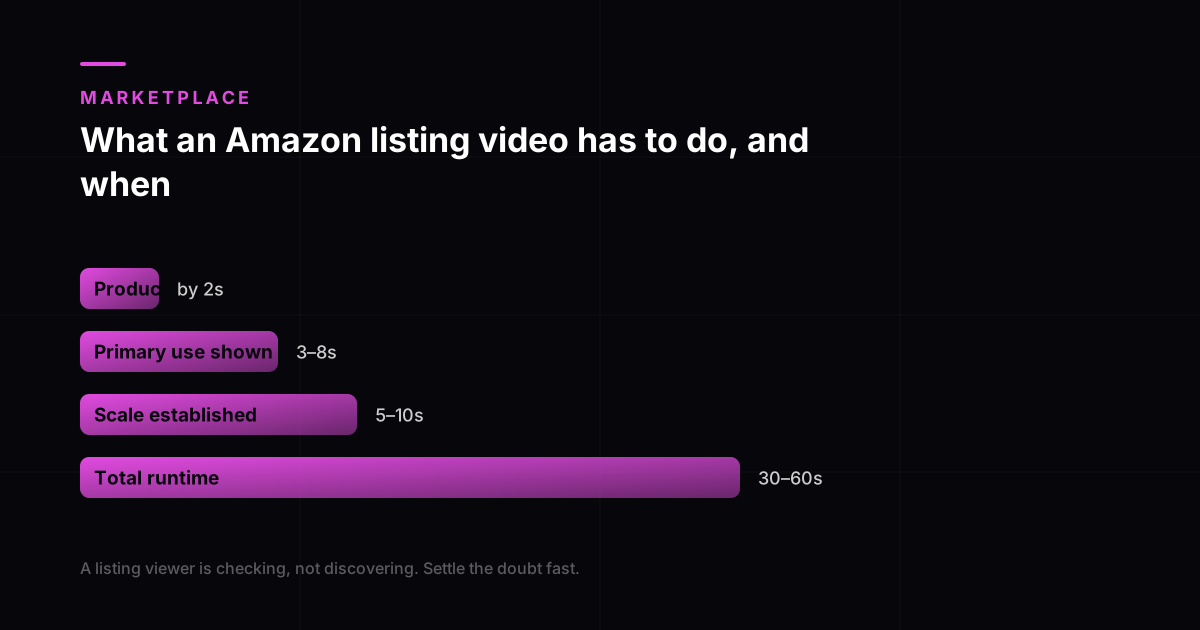
- Product identifiable on screen
- By 2s
- Primary use shown
- 3 to 8s
- Scale established
- 5 to 10s
- Total runtime
- 30 to 60s
A listing viewer has already found you and is checking, not discovering. The job is settling doubt quickly rather than stopping a scroll.
Everything above assumes the listing itself clears Amazon's own bar first. Amazon's product image guide asks for 1,600 pixels on the longest side before zoom is enabled, and a listing whose stills fail that will not be rescued by video. Get the images right, then add the video to answer what a still cannot: motion, scale and use.
Design it for silence as well. Listing pages autoplay muted, so anything essential has to be visible rather than spoken. Captions are the accessible version of the same discipline, required at Level A under WCAG. What a product video is covers how this cut differs from a Meta ad, and our product video work cuts listing and ad versions separately rather than resizing one file.
Frequently asked questions
How long should an Amazon listing video be?
Amazon guidance points at 15 to 30 seconds, and 20 to 30 tends to perform best. Beyond the spec, the practical rule is that the video ends when the doubt is answered. A simple product needing one demonstration works in fifteen seconds; something with assembly or sizing may use the full thirty. Padding to fill the allowance only lowers the share of people who reach the end.
What are the Amazon listing video requirements?
16:9 landscape, 15 to 30 seconds, at least 1280x720 with 1080p preferred, MP4 or MOV, typically under about 500 MB, no watermarks, and no branding in the first five seconds. You also need Brand Registry enrolment to add video to a detail page at all. Upload through Catalog then Upload and Manage Videos in Seller Central, and expect roughly two days for review.
Do I need a different video for Amazon and for Meta ads?
Yes, and the orientation alone forces it: Amazon detail-page video is 16:9 landscape while Meta and TikTok are vertical. Beyond that, the Amazon cut opens on the product in use for a warm shopper and the Meta cut opens on a hook for a cold one. They can share footage, a script and a production day, but they are two edits, and exporting one timeline at two ratios produces a listing video that hooks nobody and a social ad that informs nobody.
Do I need Brand Registry to add a video to my listing?
Yes. Adding video to a product detail page requires enrolment in Amazon Brand Registry, which in turn requires a registered trademark. This is a hard gate rather than a preference, so confirm your enrolment status before commissioning production. Sellers without Brand Registry sometimes commission listing video and then discover they cannot upload it.
Can I use AI-generated video on an Amazon listing?
Yes, provided the video represents the product accurately. The concern with generated footage on a listing is not the production method, it is misrepresentation. A generated shot showing a texture, colour or capability the real product does not have is a policy and returns problem regardless of how it was made. Generated footage of the real product doing what it really does is fine.
Does a listing video actually increase conversion?
It depends entirely on whether the video resolves a real hesitation. A video that repeats what the images already showed adds nothing. A video that settles the sizing question buyers keep asking in the reviews can move both conversion and the return rate, and the return rate is often the more valuable of the two. Treat it as a test on your own listing rather than a guaranteed lift.
Where does the listing video appear?
On the product detail page in the image carousel, and depending on your brand registry status it can also appear in related video placements and A+ content. The carousel placement is the one that matters most, because that is where a shopper who is already evaluating your product will find it.
Does Amazon’s AI assistant read my listing video?
No. Rufus, renamed Alexa for Shopping in May 2026, reads listing content rather than watching video. Anything your video is the sole proof of is invisible to it. The fix is to ensure every fact the video demonstrates also appears as text in the bullets, description or A+ content.
How does Amazon’s AI shopping assistant affect my listing?
It decides which products get shown in response to a shopper question, so it works as a qualifying layer before your page is even seen. More than 250 million shoppers have used it and interactions are up over 210 percent year on year, with users reported to convert around 60 percent higher than keyword search. Enriched listings are reported to see 10 to 30 percent higher click-through from AI recommendations.