What Is a 3D Website? How They Work and When They Are Worth It
A 3D website is an ordinary HTML page carrying one or more scenes drawn in three dimensions by the browser itself, using WebGL or WebGPU, which respond to scroll, cursor or time. The 3D arrives as live geometry rather than as a video file, and that is what lets it react to the visitor. Done well it directs attention and explains something faster than a flat image could. Done badly it is a heavy page that spins for no reason.
The short answer
A 3D website is a web page where part of what you see is drawn in three dimensions by the browser, in real time, and responds to what the visitor does. Scroll and the camera moves. Move the cursor and the object turns. Resize the window and the scene recomposes.
Underneath, it is still a web page. Headings, paragraphs, links, forms and metadata all work exactly as they always did. The 3D is a layer, not a replacement. That distinction matters more than any other point on this page, and it is the one most buyers are never told.
How the browser actually draws it
Every modern browser ships a graphics API that hands instructions straight to the device GPU. WebGL is the older one and is supported on effectively every phone, tablet and laptop in active use. WebGPU is the newer replacement, and as of 2026 it ships in Chrome, Edge, Safari and Firefox, though not yet on every platform Firefox supports.
- A canvas element is placed on the page, like an image would be.
- Geometry, textures and lighting are sent to the GPU once, up front.
- A render loop redraws the scene every frame, usually 60 times a second.
- Scroll position, cursor position or a timer feeds numbers into that loop, which is what makes the scene react.
The four kinds you actually see
| Type | What it does | Best used when |
|---|---|---|
| Hero scene | One 3D object or environment above the fold, reacting to cursor or slow ambient motion | The product is physical, or the brand needs to look unlike its category |
| Scroll-driven story | The camera moves through a scene as the visitor scrolls, revealing steps in order | You are explaining a process, a mechanism or a build in sequence |
| Product configurator | The visitor rotates, opens or recolours a real product model | Buyers ask questions a photograph cannot answer, like scale, finish or fit |
| Ambient background | Depth, particles or geometry behind the copy, never in front of it | You want atmosphere without asking the visitor to interact with anything |
Most sites need one of these. Very few need three. Each additional scene adds weight, adds a thing to test on a mid-range phone, and adds another chance for the page to feel busy rather than considered.
What a 3D website is not
- A video background. That is a flat file playing on a loop. It cannot react, and on mobile it often will not autoplay at all.
- Parallax scrolling. Layers moving at different speeds is a two-dimensional trick, and an old one.
- A card that tilts on hover. That is a CSS transform. Useful, cheap, not 3D rendering.
- A spinning logo. That is an animation, and usually the exact thing that gives 3D a bad name.
The line is simple. If the thing on screen is being calculated frame by frame from geometry and light, it is 3D. If it is a picture being moved around, it is motion design. Both are legitimate. Only one of them costs you a GPU budget, and you should know which you are buying. The gap shows up in the quote, which is why 3D website design cost in India is priced per scene rather than per page.
When 3D earns its place
- The product is physical and its shape, scale or finish is part of why people buy it.
- You are explaining something sequential, where seeing step two follow step one is faster than reading it.
- Your category all looks the same, and the first three seconds are doing the differentiating.
- The visitor needs to inspect something before committing, and a gallery of photographs keeps failing to answer it.
When it does not
- The page exists to be found and read fast. A support article does not need a camera move.
- Nobody on the team can name what the scene helps someone understand. That is the test, and it is failed more often than it is passed.
- The budget is tight enough that 3D would come out of the copywriting. Words convert. Geometry supports them.
- The audience is overwhelmingly on low-end devices and slow connections, and the scene cannot be made cheap enough to be fair to them.
What it takes to build one properly
Three disciplines have to agree. Design decides what the scene shows. Engineering decides what it weighs. Content decides what the page says without it, because the page has to work with the scene switched off, for search engines, for reduced-motion users and for anyone on a device that struggles.
When those three are done by different vendors who never speak, you get the version everyone complains about: beautiful, slow, invisible in search. When they are decided together, you get a page that loads fast, reads clearly and happens to be memorable. See how that compares to a template build before you choose either.
The two constraints that decide the build
Everything above is design. Two engineering constraints decide whether the result survives contact with real visitors, and both are measurable rather than matters of taste.
The first is weight on a mid-range phone, judged against Core Web Vitals rather than against how it feels on the machine it was built on. The second is that the page must be complete in HTML with the canvas switched off, because a crawler and a reduced-motion visitor both receive that version. Do 3D websites slow down your site covers the first, are 3D websites good for SEO covers the second, and our 3D motion website design service treats both as scope rather than as optimisation to be done afterwards.
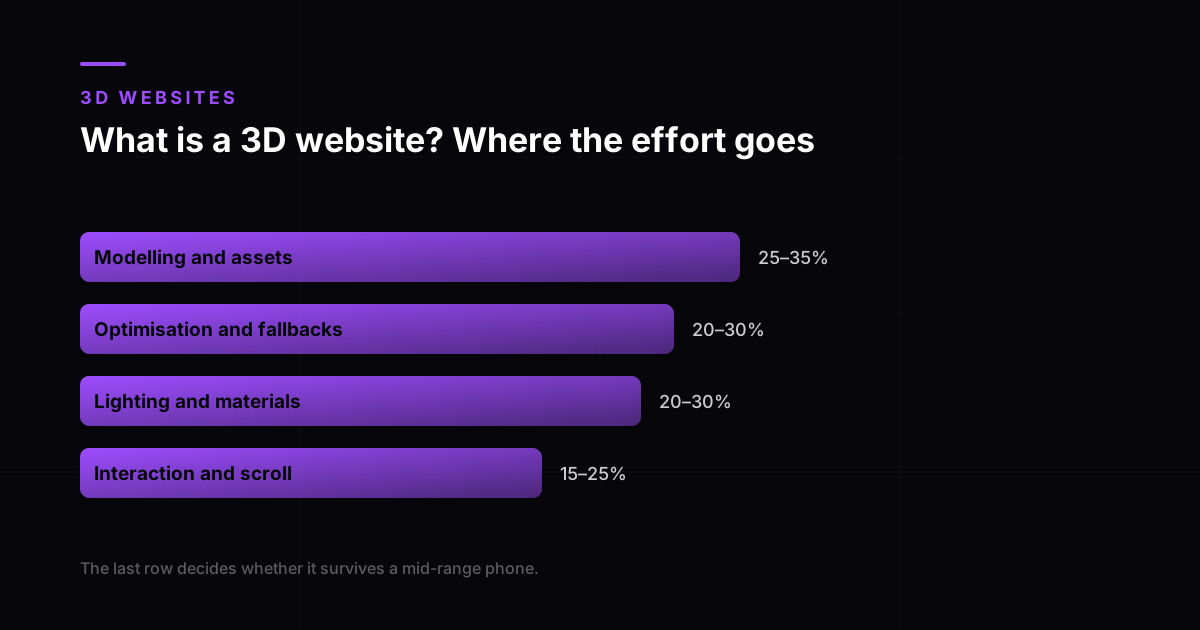
- Modelling and asset preparation
- 25 to 35%
- Lighting, materials and art direction
- 20 to 30%
- Interaction and scroll choreography
- 15 to 25%
- Optimisation and device fallbacks
- 20 to 30%
Our own split across recent builds. The last row is the one most often left out of a quote, and the one that decides whether the scene survives a mid-range phone.
That final quarter is the difference between a demo and a website. A scene can look finished and still be unshippable, because it has no reduced-motion version, no low-capability fallback and no weight budget. Those are measured against Core Web Vitals on real visits rather than on the machine it was built on. Do 3D websites slow down your site covers that budget in full.
Frequently asked questions
What is a 3D website?
A web page carrying one or more scenes drawn in three dimensions by the browser in real time, using WebGL or WebGPU, which react to scroll, cursor or time. The page itself stays ordinary HTML. The 3D is an additional layer on top, which is why a well-built one still works completely with the scene disabled.
Is a 3D website the same as a website with a video background?
No. A video background is a flat file playing on a loop, identical for every visitor, and it frequently fails to autoplay on mobile. A 3D scene is calculated frame by frame from geometry and light, which is what allows it to respond to scroll position, cursor movement and screen size. The ability to react is the only reason to pay for 3D instead of video.
Do all browsers support 3D websites?
Yes for WebGL, which runs on effectively every phone, tablet and computer in active use. WebGPU is the newer and faster API, and by 2026 it ships in Chrome, Edge, Safari and Firefox, though Firefox has not yet enabled it on every platform. A site built responsibly detects capability and falls back to a static image where 3D is unavailable or unwise.
Does a 3D website work on mobile?
It has to, and it will not by accident. Phones have less memory, less thermal headroom and smaller screens, so the mobile version of a scene is a separate design decision rather than the desktop one scaled down. That usually means fewer objects, smaller textures and a shorter camera path. StatCounter put about 66 percent of India’s web traffic on mobile in July 2026, so for most businesses here the phone version is the real version.
Will a 3D website hurt my Google rankings?
Only if the content lives inside the canvas. A canvas paints pixels and contains no text, headings or links for a crawler to read, so every word you want indexed must exist in the HTML as well. Build it that way and the 3D layer is invisible to search, apart from the weight it adds, which is a Core Web Vitals question rather than a content one.
How do I know if my business actually needs 3D?
Answer one question: what would the scene help a visitor understand faster than your headline and a photograph already do? If you have a clear answer, 3D is probably worth it. If the honest answer is that it would look impressive, spend the money on the writing and the page speed instead, because both of those move enquiries and neither costs you load time.