What Is an Explainer Video? When Your Business Needs One
An explainer video is a short video, usually 60 to 120 seconds, that makes an unfamiliar product, service or process understandable quickly. It differs from a product video, which sells a specific item, and from a training video, which teaches someone who has already committed.
When you actually need an AI explainer video
When people do not understand what you do. Not when they are unconvinced, which is a different problem with a different solution.
- Your category is new, so there is no existing mental model to borrow.
- Your product involves a process people cannot picture from a description.
- Your sales calls all begin with the same fifteen minutes of explanation.
- Your support inbox receives the same conceptual question repeatedly.
If none of those apply, an explainer video is probably not your bottleneck, and a clearer page will do more.
The four types
| Type | Good at | Typical length |
|---|---|---|
| Problem and solution | Introducing an unfamiliar category | 60 to 90s |
| How it works, step by step | Processes with distinct stages | 90 to 120s |
| Animated concept | Abstract or invisible services | 60 to 90s |
| Screen walkthrough | Software and digital products | 60 to 180s |
Structure that works
- Seconds 0 to 10: the problem, in the viewer’s own words. Not your company name.
- Seconds 10 to 30: why existing options fall short. Brief and fair.
- Seconds 30 to 75: how yours works. Three steps, not seven.
- Seconds 75 to 90: the outcome, stated concretely.
- Final 10 seconds: one instruction.
Where it belongs
Reported conversion lifts vary by placement, and the pattern is consistent enough to plan around even though the individual figures come from vendor studies rather than controlled research.
| Placement | Reported lift | Effect |
|---|---|---|
| Homepage, above or near the fold | 20% to 80% | Reduces bounce from confused visitors |
| Landing page | 30% to 60% | Answers the question the ad raised |
| Product page | 25% to 50% | Closes the last doubt |
| Pricing page | Not reported | Answers "what am I actually buying" |
| Sales email or deck | Not reported | Replaces the first fifteen minutes of every call |
| Onboarding flow | Not reported | Cuts early support tickets |
Read the ranges as ranges rather than as forecasts. The spread between 20 and 80 percent is the honest signal: the lift depends almost entirely on how confused your visitors were to begin with. A page whose visitors already understand the category gains little, which is the same point the section above makes about when you actually need one.
When a written page is better
When the information needs to be searchable, skimmable, or referred back to. A video cannot be scanned or quoted easily, and the file itself carries none of the text a crawler reads, which is why Google's own video documentation asks you to supply the title, description and structured data separately. For anything a customer will return to repeatedly, write the page and use the video as the introduction to it.
Producing both is usually the right answer, and the script for one is most of the draft for the other. If the explainer is really a process people keep asking about internally, it belongs in a training library rather than on a landing page. See the main types of product video for the commercial equivalent, or our explainer and training video service for the internal one.
How long an AI explainer video should run
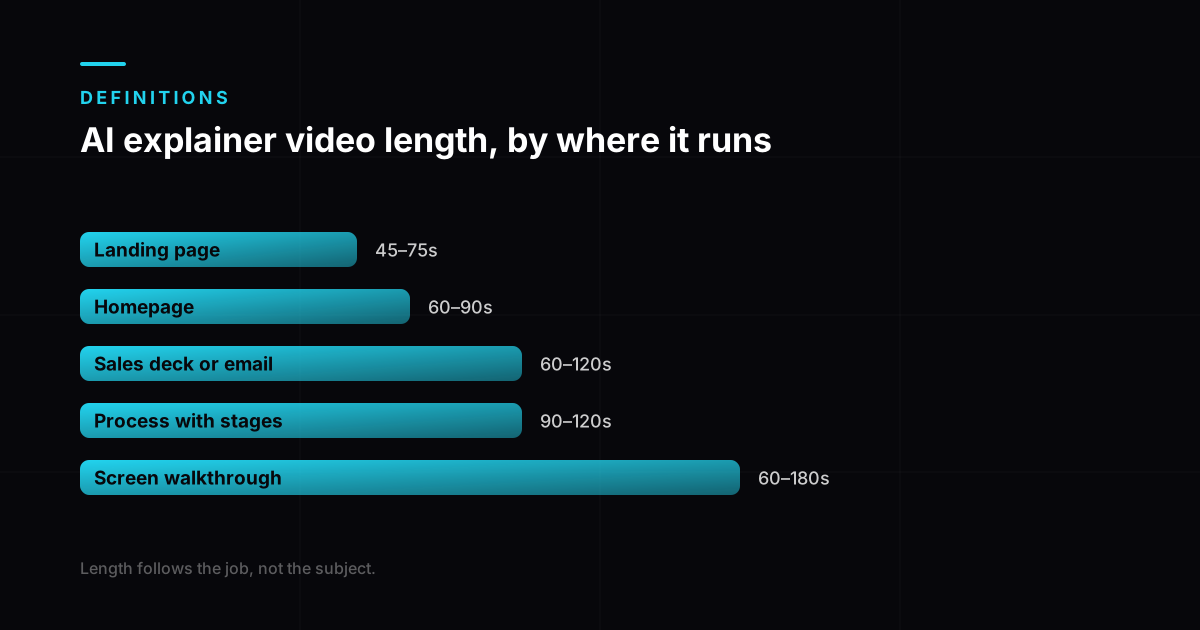
Length follows the job rather than the subject, and the ranges are narrower than most briefs assume. Going longer almost never fails because of attention; it fails because the extra minute is answering a question the viewer had not asked yet.
- Homepage or above the fold
- 60 to 90s
- Landing page after an ad
- 45 to 75s
- Process with distinct stages
- 90 to 120s
- Software screen walkthrough
- 60 to 180s
- Sales deck or email
- 60 to 120s
Conversion-focused explainers cluster at the shorter end. The longer ranges apply where the process genuinely has separate stages, not where there is simply more to say.
What to cut when it runs long
Almost every over-length explainer contains the same three passengers. The company introduction, which nobody is watching to hear. The second example, which restates the first. And the feature list at the end, which belongs on the page rather than in the film. Removing those three usually recovers thirty seconds without touching the explanation itself.
The test for whether a cut is safe: does the viewer still understand what the product does and why it matters to them? If yes, the material was decoration. If no, you cut the wrong thing. The four types above each have a different natural length, and starting from the right one saves most of this editing.
Where the video needs supporting text
An explainer that lives on a landing page is doing two jobs, and only one of them is visible. The second is being findable, and video is structurally bad at it. The file carries none of the text a crawler reads. That is why Google's own video documentation asks you to supply the title, description and structured data separately. Publish the script as page copy underneath the player. It costs nothing, it makes the page rank for the question the video answers, and it serves the visitors who would rather read than watch. how product video differs by placement covers the commercial cousin of this.
Why the honest range is so wide
Reported conversion lifts from explainer video vary enormously between sources, and the width is the finding rather than a flaw in the data. The effect depends almost entirely on how confused visitors were to begin with: a page whose audience already understands the category gains very little, and a page introducing something genuinely unfamiliar can gain a great deal. Treat published figures as a direction rather than a forecast, and measure your own page against itself. Publishing the script as page copy also makes the result measurable in search rather than only on the page, which is why Google's video documentation asks for the title, description and structured data to be supplied separately from the file.
Measuring whether it worked
An explainer is easier to evaluate than most video because the confusion it targets is observable. Watch three things rather than views: whether pre-sale questions about the same topic fall, whether time-to-first-meaningful-action on the page improves, and whether sales calls still open with the same fifteen minutes of explanation. If none of those move, the video explained something people already understood. Publishing the script as page copy gives you a fourth signal, search impressions for the question itself, which is why Google's video documentation asks for text and structured data alongside the file.
Frequently asked questions
How long should an explainer video be?
Sixty to ninety seconds is the range most commonly reported as optimal for a conversion-focused explainer, and it matches what the format can actually carry. Up to about two minutes works where the process genuinely has distinct stages, and screen walkthroughs can run longer because the viewer is following along rather than being pitched. Past two minutes, the usual cause is that the video is covering two things and should be two videos.
Do explainer videos actually increase conversions?
Reported lifts run roughly 20 to 80 percent depending on placement, with homepages at the wider end and product pages nearer 25 to 50 percent. Treat the spread as the real finding: the gain depends almost entirely on how confused your visitors were beforehand. If people already understand what you sell and are simply unconvinced, an explainer addresses the wrong problem and the lift will sit at the bottom of that range or below it.
What is the difference between an explainer video and a product video?
An explainer makes an unfamiliar thing understandable; a product video sells a specific item to someone who already understands the category. The tell is what the viewer is missing. If they cannot picture what you do, that is an explainer. If they can picture it and are weighing whether to buy, that is a product video. what makes a product video work covers the other side.
Do we need an explainer video if we have a good website?
Often not. An explainer earns its place when your category is genuinely new, when the process is hard to picture, or when every sales call starts with the same fifteen minutes of explanation. If none of those apply, a clearer page will usually outperform a video, and it has the advantage of being searchable.
Should an explainer video be animated or live action?
Animation suits abstract or invisible services, because you can show a process that has no physical form. Live action or screen capture suits anything the viewer will actually see and touch, including software. The decision should follow what needs showing rather than the aesthetic preference, and screen capture is frequently the clearest option for digital products.
Where should the explainer video go on our site?
Homepage near the fold is the highest-value placement, because that is where confused visitors decide whether to stay. Pricing pages are the second most useful, since the question there is often what am I actually buying. Putting it only on an About page, which is where it commonly ends up, means almost nobody who needs it will see it.